Monday, August 3, 2020

Subscription Box Business: 7 Tips To Consider Before Starting Online Subscription Box Business In 2020


Looking to sell subscriptions online? If yes then you have landed on the right article where we will highlight some tips that you can consider before starting an online subscription box business.


With the increase in online shoppers and competition, sellers are seeking unique ways to sell their products to their customers. Starting or including a subscription box in your business can help you to reach out to the new customer and grab their attention on your product.


The subscription eCommerce market is growing rapidly with a business selling beauty products to wines to toys and many more. Mainly in subscription box sellers combine and mix a selection of products around a particular theme. For example a grooming kit, chocolates, wines, toys, and more.


Customers schedules their subscription box depending on their requirement and there are few online store thet allows customers to customize their subscription box. Offering these types of features enhances your selling experience and customer’s buying experience.


It is said that the lifetime value of a subscription buyer is much higher than a normal shopper. Because your subscription box buyer brings more revenue and value compared to a normal shopper. If you are having products that can be converted into weekly or monthly subscription box then ts worth including subscription box in your online store.


In this article, we will help you to identify different easy that can help you to enhance your online subscription selling store.


If you are looking to create a woocommerce store for your business then check our article on How To Set Up A Fully Functioning WooCommerce Store Using WordPress?


6 tips to consider before selling subscription box online in 2020


1. Select a niche and subscription box idea for your store


Before you start selling any subscription box first identify what you are passionate about which will directly help you to select the niche for your subscription. If you already have a running online store then you can skip this step. But if you are planning to start new online to sell subscription then first identify what you would like to sell to your customer?


In reality, a subscription box business is something that requires creativity, target market research, and mainly depth knowledge about how the product works and solves customer problems. A creative idea can separate your subscription commerce business from your competitors.


Analyzing your target market, competition, customer profile and more can help you build an effective and efficient subscription box business for your website. Before staring your subscription box business you can  identify the answer  for below-listed questions:


  • What is the niche you are going to select for your subscription box business?
  • Who is going to be your competitor?
  • Who is your target audience?
  • How your subscription box business can solve your target audience’s problem?
  • What type of subscription box customer expects?


If you are a new beginner then getting an in-depth insight about all the above mentioned can be tough. But make sure you study your competitor’s subscription business so that you can offer and create more i=engances version of subscription boxes. Read more on

https://www.sfwpexperts.com/subscription-box-business/


Contact Details:


213-277-9177


la@sfwpexperts.com


Web design Los Angeles


Read More Blogs:


5 Best WordPress Security Plugins To Use In 2020


Grow Ecommerce Website Sales And Traffic In 2020 Using Content Marketing

Wednesday, July 29, 2020

5 Best WordPress Security Plugins To Use In 2020


With the increase, the wordpress website vulnerabilities and different malicious activities identifying and installing the best WordPress security plugin can help you to get rid of various wordpress security issues.

WordPress is the most widely used platform with millions of users, its popularity and usability invite hackers. There is a vast wordpress developer community that is working regularly to offer a secured environment to its user by removing or fixing all the known vulnerabilities.

But third party themes and plugins make it easy for them to hack a wordpress website. To avoid that there is some best wordpress security plugin built specifically for WordPress to help users avoid WordPress security issues.

In the article, we will help you to identify the best wordpress security plugin that you can use to secure your website from hackers and intruders. We are also going to list the important features of different wordpress security plugins to make your selection process much easier.

If you are looking to know how you can secure your wordpress website  WordPress Security Guide: 8 Tips To Secure WordPress Website In 2020

Best WordPress Security Plugin To Use In 2020

1. Sucuri (WordPress Security Plugin)

When we talk about the most popular, powerful, and effective wordpress security plugin then the Sucuri Security name pops up in every wordpress professional mind. Whether you are at your initial stage or you have an old and popular wordpress website.

Sucuri Security is considered the best choice for all types of WordPress websites. It comes with various security features like security audits, Blacklist monitoring, Security hardening, Malware scanning, and more.

The best part about Sucuri is, all the mentioned features come for free except website firewall.

If you are looking for a cost-effective wordpress plugin for your website then Sucuri should be your primary choice. Its free feature makes it the best wordpress security plugin for beginners.

If your website comes across any kind of hack or malicious activities then Sucuri offers all the actional step that is required to overcome or repair those damages. If you think your website is 100% secured then its time reconsider your thinking.

Every WordPress website come across security-related issues. Using Sucuri as your WordPress security plugins enable you to get the notification for any malicious activities happening within your website.

Not only that but Sucurri also enables you to check the status of the different elements present in your website for its correctness. Whenever you come across any technical glitch in the plugin you can always reach out to their customer support. Read more on


Contact Details:

213-277-9177


Read More Blogs:


Sunday, July 26, 2020

WordPress Security Guide: 8 Tips To Secure WordPress Website In 2020


Are you looking for the WordPress security tips that enable you to protect your WordPress website design?

WordPress security is one of the most discussed topics that is troubling almost every WordPress website owner. If you are working with WordPress then you should always care about your website security.

No matter how effective and persuasive your WordPress website design and the product is for the customer. Without proper security, you can be on the verge of risking not only your website data but also your customer’s data.

Compared to other platforms WordPress is considered the most secure platform but with the increase in the number of the users, plugins, and third-party add-ons chances of unwanted vulnerabilities increases.

Don’t worry in this article, we will help you to ideally why you need to secure a WordPress website and different tips and techniques for WordPress security. Not only that but this article will also give you insight about the common mistakes that give rouse to WordPress vulnerabilities.

If you are looking to creating a fully responsive and conversion-centric WordPress website design for your business then check out the guide on WordPress Website Design Guide: Things To Know Before Creating WordPress Websites

Before moving ahead with how to secure your WordPress website lets identify why is WordPress website security important?

Why WordPress website security matter?

With the increase in the number of WordPress websites, most websites are focused on improving their traffic and revenue. Yes, your WordPress website organic traffic, and sales play a curial role for your business but apart from that your WordPress website security also plays an important role in protecting your business revenue and reputation.

Once your website gets hacked by an intruder or hacker then it can do serious harm to your website traffic, revenue, and reputation. With the increase in the number of WordPress vulnerabilities its time to consider protecting your WordPress website by taking all the necessary security measures.

Once your website gets hacked then you may lose your data as well your customer’s data can also be on risk.  Today there are various malicious activities happing around like sealing user’s payment details, information, installing malicious software in the WordPress website, and many more.

According to the recent report by Google, more than 50 million users were warned about the presence of malicious activities like malware, seating information, and more on the website they are visiting.

If your website is not secured then there are chances thet google will start displaying the same message to the users there are visiting your website. Offering the right security to your WordPress website can help you to avoid unwanted vulnerabilities. Read more on


Contact Details:

213-277-9177


Read More Blogs:


Friday, July 24, 2020

Best WordPress Theme Builders On The Market


A will to do different, appear different or just make a different mark online often push people to take actions that they haven’t done before, right? The mindset while building an impressive website for your personal blog or company remains more or less the same. Sometimes you simply don’t know what to do and how to do but to make your website stand out for sure. Amid all these things running in your mind, somewhere you firmly believe that having a class apart design will only draw a lot of eyeballs to your site.


Now a question to ask yourself - what’s the core of a website layout? You may say navigation, colors, fonts or anything similar but it’s the themes that largely determines the look of any website. While there are a number of themes at your disposal to build a gorgeous-looking WordPress website design, you can learn ways to develop your own specific themes as well. All it takes is choosing a feature-rich and suitable theme builder from the lot and pumping out numerous appealing themes out of that. Though all available theme builders are different from its competition, there are a few basic areas where they share almost the same properties.


In this blog, we take a look at some of the best WordPress theme builders that meet the needs of professional designers, personal bloggers, and learned entrepreneurs. But before we head ahead, I would like to make you aware of a popular establishment in the US - SFWP Experts. At core, it is an award-winning web design Los Angeles company that has blossomed into a digital marketing service provider. Yep, you read that right! They are apt to be approached for a wide array of professional services including WordPress web design, web development, website support and maintenance, SEO, PPC, and a few more.


With that on break, let’s move to the main subject of this post - what are the top 5 theme builders for WordPress.


5 Of The Best WordPress Theme Builders Compared


1. Thrive Theme Builder


While most of the theme builders in the space frequently make you move from one menu to another for editing each element like headers and footers, Thrive Theme Builder lets you relax at least on this part. Actually, the site wizard it contains lets you customize the whole of your website quite fast. All you need to do is upload your logo, choose templates for different areas of your site, and edit them using a drag and drop editor within the tool.


Contact Details:

213-277-9177


Visit Reference Profile Websites:


Wednesday, July 22, 2020

8 Ways To Optimize Woocommerce Product Page To Drive More Sales In 2020


With the rapid increase in the number of online shoppers and stores, making your woocommerce store successful is not an easy job. There is a lot that goes into persuading shoppers to add products in the cart from your WooCommerce product page.

If you are looking to generate more sales from your woocommerce store then its time to optimize your woocommerce product page. Even if you are not getting enough of visitors on your product page then optimizing woocommerce product page will help you to make your product page more convincing.

According to Statista, US Ecommerce sales reached 343 billion dollars by 2019 and they are expected to rise to a booming amount of 638 billion dollars by the year 2022. Creating attractive and persuasive woocommerce product pages will not only help you to grow your sales but it will also encourage customers to make their next purchase form your store.

If your goal is to improve your woocommerce product page traffic and sales then you have to think beyond making the product available. Yes, product page customization can be a good option but other than that there are effective optimization tips that you can consider to make your product page compelling.

In this article, we will help you to identify different ways or tips using which you can optimize your woocomerce product page to encourage your customer to add products in the cart and make a successful purchase.

If you are looking to create or customize your woocommerce product page then check our blog on WooCommerce Product Page: Tips To Customize Your Product Page In 2020

Tips to optimize your woocommerce Product page to increase sales and revenue

1. Use clear and descriptive product name

When it comes to optimizing woocommerce product page we always recommend you focus on creating a clear and descriptive product name. No matter how compelling the woocommerce product page design you create for your store, creating a clear title will grab your visitor’s attention.

The product title that you use on your single product page will also appear in the store’s shop and category page. Not only that but the name can also appear in the store sidebar and footer. Creating an effective title for your parge page will serve you many benefits in terms of customer buying experience, sales, and more.

To create an effective product name make sure to describe your product what it is about and how it can help visitors. Giving detailed product names will make it easy for the customer to select and purchase the product.

Remember your product title should not only help shopper but it should also help search engine bot to understand the purpose of the page. Including a target keyword relevant to the product in your title will help you to optimize your product page for search engines. That’s why we recommended you create a detailed product name for your web page.

Try to keep your title short and descriptive. Make sure that within a few words you are able to describe your product. Considering this woocommerce product page optimization strategy will surely offer you impactful results.

2. Create a clear call to action button

Undoubtedly every woocommerce product page has one goal to achieve, to encourage customers to hit the add to cart button, buy now button, or any other call to action button. That means you want your customer to perform some action that’s why you are creating a product page.

To achieve that you need to create a clear call to action button that is easily visible and accessible by the shopper. Your call to action button “like add to cart. buy now and more” are the most important part of your product page. That why itis recommended creating a call to action button that stands out from surrounding content. Read more on


Contact Details:

213-277-9177


Read more Blogs:


Sunday, July 19, 2020

WooCommerce Product Page: Tips To Customize Your Product Page In 2020


The Woocommerce product page is one of the most important pages in your Woocommerce website. By default, every woocommerce product page design tends to look the same, but the different products in your e-store require unique design depending on its feature and functioning.

Do you want your Woocommmerce product page to grab more visitor’s attention and convert them into paying customers? If yes then its time to create and customize woocommerce product page design for your ecommerce website.

Woocommerce has made it easy for retailers to expand their operations in different countries. Using its user-friendly interface any new beginner can create a fully functioning online store without touching a single bit of code.

With the increase in the number of online shoppers, many ecommerce websites have started to focus on producing product-specific woocomerce product pages with a single goal to achieve. And the best part is that creating a single product page is making the buying process easier and quicker which is directly improving customer experience.

In this article, we will help you to identify how you can create and customize woocommerce page design to attract more visitors. Not only that but we will also help you determine different features that you can add on your product page to make it more effective and efficient.

If you are looking to know th best woocommerce themes for creating an attractive online store for your business then you can check out the article on 21 Best WooCommerce Themes (2020) For Your Ecommerce Website

How to create and customize the Woocommerce product page?

Today if your woocomerce product page design stands out from the crowd then it will surely help you to convert your visitor into paying customers. But for that, you need to have a design that meets customer expectation and encourage them to take the desired action.

From the above statement, we don’t imply that you should focus on adding too many media and other elements. A simple design with all the necessary product widgets is more than enough to create the best woocommerce product design for your shoppers.

Lest dive in and check how you can create and customize the woocommerce product page using the elementor plugin. But before that lest check the prerequisite

Prerequisite

We don’t have to mention that you need to install wordpress before moving to any further step. After installing wordpress, you need to have woocommerce plugins installed and setup. These two are the basic requirements, to build a product page for the online store you need to install and activate elementor plugin.

Elementor comes with a free and paid version both. If you are having a budget then you can opt for Elementor Pro that will cost you $49/year or you can go with a free version with limited features.

There are other page builder plugins that you can use for building your product page. But for now, we are going to Highlight how you can create and customize the woocommerce product page using elementor.

To download the elementor plugin:

  • Go to the plugins in the WordPress dashboard
  • Click on add new
  • In the search box type Elemntor
  • Install and activate the elementor plugin in you wordpress dashboard
  • After activation, you will find an elementor option appearing in the left side of you wordpress dashboard


To install the Elementor Pro plugin:

Installing elementor pro is a little different from the normal elementor plugin installation. To install elementor in your word[press dashboard first you need to purchase the elementor pro version for their website.

Next, you have to download and upload the ZIP file which you got after purchasing the plugin.

  • Go to wordpress dashboard
  • Navigate to the plugins section
  • Click on add new
  • On the top, you will upload plugin option click on that to upload the plugin
  • Upload the ZIP file from your desktop and click on install
  • To take advantage of the plugin
  • You need to validate the plugin before using its feature


After downloading the plugin next you can make use of its feature to customize your website and more importantly build your WordPress product page as well as the landing page. Read more on


Contact Details:

213-277-9177


Read More Blogs:


Friday, July 17, 2020

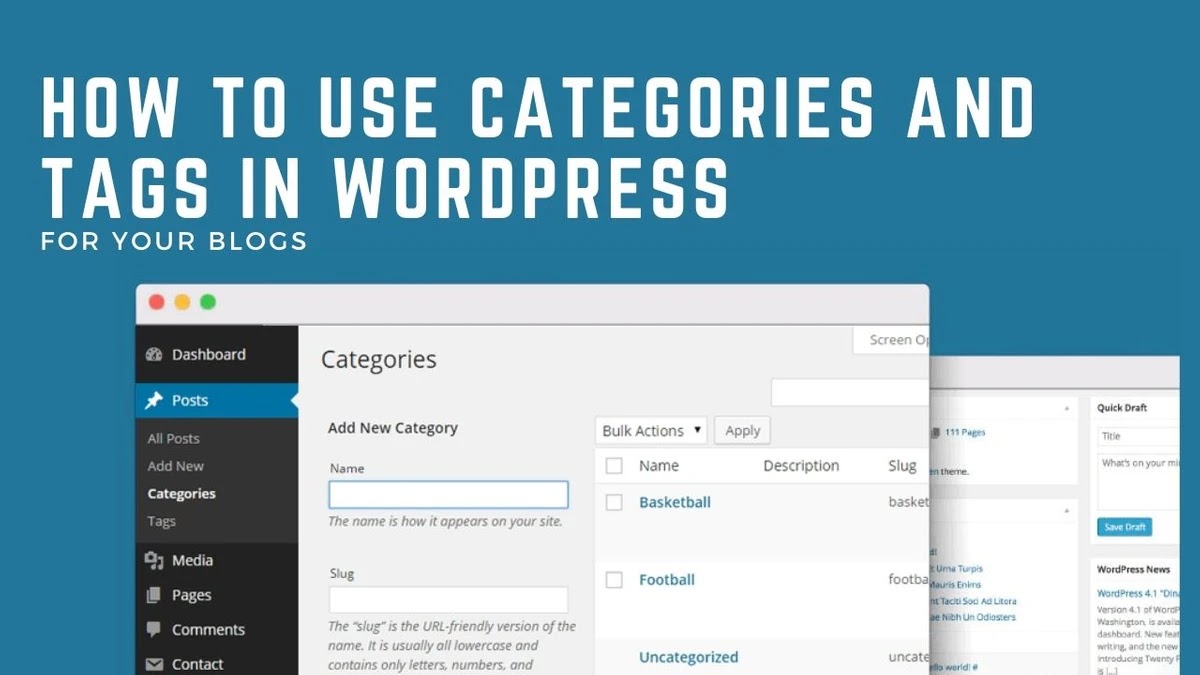
How To Use Categories And Tags In WordPress For Your Blogs - Mystrikingly


Articles are one of the richest sources of information, no matter if it is published on the web or magazine. Visitors often come to websites in a hurry to grab the desired information. So, it’s imperative for you to have all the posts on your website in a neat, clean, and organized manner. Maybe they have come to your site just to read one blog but now they want more of it. In that scenario, your content pieces should be readily available for their consumption else they will hit the back button.


The whole point of discussing all these things is making you aware of how you can arrange all your blog posts. First of all, being a WordPress user itself brings you a lot of advantages, and blog organization is not a big deal. This hugely popular platform has a built-in taxonomy system to let you group blogs in an easy way. This consists of categories and tags that you can assign to each written product according to the topic they cover. But before you go any further, you need to first determine your blog niche and make sure it falls under the interest area of your audience. Because the posts that don’t get enough engagement or comments aren’t going to benefit you anyway, and more importantly it is not worth the time and effort you put.


In this blog post, we’ll gain a deeper insight into how to use WordPress categories and tags for your blog niche. But before you perceive that, I would like you to give a look to an award-winning web design company in Los Angeles - SFWP Experts. Actually, the reason you need to get familiar with this agency is that you can get in touch with them for availing a wide variety of services for your website enhancement or its promotion. That’s not the whole, you can also choose them as your trusted project partner if you have SEO or online marketing in mind.


With that at the end, let’s have a brief discussion on how to rearrange your blogs using WordPress categories and tags.


First, take a look at what WordPress categories and tags actually are:


What Are WordPress Categories And Tags?


As said earlier, categories and tags are like features of WordPress that allows you to categorize the content on your site based on the topics they are written on.


For instance, you can see the taxonomies for blogs shown below:

  • Reviews - In this category you can add all articles focused on reviews for themes, plugins, and other software in WordPress.

  • Plugins - Here you can store all the blog posts covering WordPress plugins.

  • Themes - This should have all the written materials about WordPress themes.


The two main advantages of using taxonomies for your blog arrangement are that it facilitates the process for your visitors to find the content they are looking for and helps your content marketing strategy to be more effective. However, to ensure success for your content marketing strategy you must find your blog niche and stick to it instead of covering a broad topic.


Now what I mean by this is you should focus on a specific topic rather than covering a huge one. Just take an example of “Sports”, it is a vast topic and could be a big pain covering it nicely. Instead, you can pick a particular game from that and write on it frequently. This will not just reduce your competitors but also improve your chances to excel at that play.


Contact Details:

213-277-9177


Visit Reference Profile Websites: